
Bottleneck Calculator – Test Your CPU, GPU, and PC Performance
Have you ever been playing Fortnite, Valorant, or CS2 and suddenly everything starts lagging? Shots aren’t landing, your FPS drops, and your PC feels like it’s struggling. You check your settings, your internet, even your GPU temperature—but everything looks fine.
The problem might be that your PC is bottlenecking. The simplest way to find out is with our Bottleneck Calculator.
This smart tool tells you in seconds what’s holding back your system. By comparing your CPU and GPU, it shows which component is slowing you down—and by how much. In just a few clicks, you’ll know whether the issue is your graphics card, processor, or RAM.
No more guessing or random upgrades. Whether you’re a gamer chasing smoother FPS, a content creator editing 4K videos, or just someone who wants a faster PC, the Bottleneck Calculator gives you the clarity to fix what really matters.
What Is a Bottleneck Calculator?
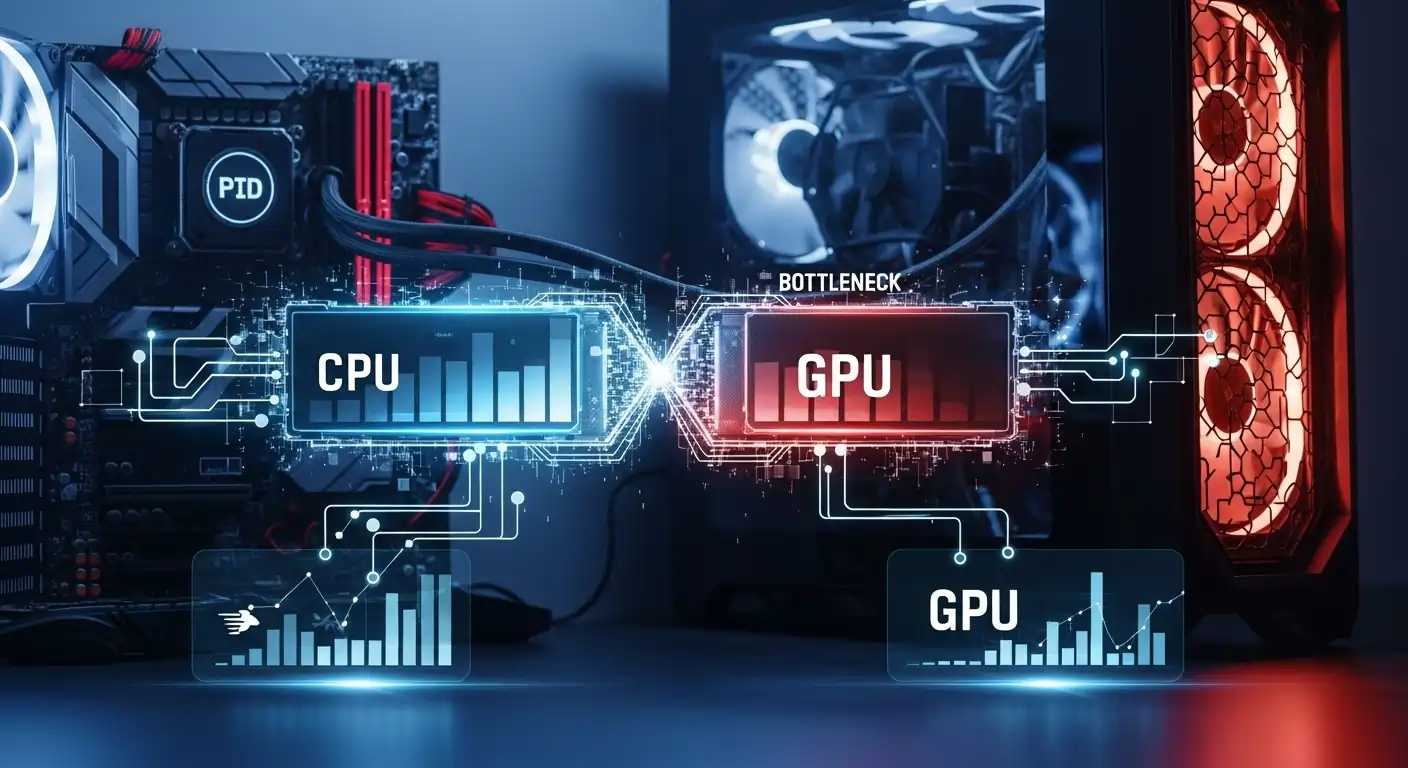
A bottleneck happens when one component of your PC limits the performance of the others—like a racing team where one runner slows everyone down. For example, if you have a high-end graphics card but an older CPU, your processor can’t feed the GPU fast enough.
The result? Stuttering, choppy gameplay, and low frame rates. It works the other way too: a powerful CPU paired with a weak GPU might not be able to display graphics as quickly as your processor can handle.
That’s where the Bottleneck Calculator comes in. It helps you identify these imbalances, giving you the insights you need to upgrade the right components and finally fix your performance issues.
Why You Need a Bottleneck Calculator?
Many gamers and creators face the same frustration:
Their PC looks powerful on paper, but still crashes or drops FPS under heavy load. That’s where the Bottleneck Calculator comes in. It analyzes your CPU and GPU, compares their performance, and instantly shows you where the bottleneck is.
No more guessing, buying upgrades that aren’t needed, or endlessly tweaking settings. You’ll know exactly whether you need a better CPU, a stronger graphics card, or just a simple configuration adjustment.
How the Bottleneck Calculator Works?
Our calculator uses benchmark data from thousands of CPUs and GPUs. By inputting your components, it calculates the performance ratio between your processor and graphics card. If one component lags significantly behind, the calculator flags it as the bottleneck.
It also provides a clear percentage breakdown showing how much your CPU or GPU is limiting performance. For gamers, this means you’ll immediately see whether your low FPS is caused by an overloaded CPU or a GPU that can’t keep up. For creators, it tells you if your hardware is slowing down rendering, exporting, or other demanding tasks.

Common Signs of a PC Bottleneck?
Here are some signs that your system might be bottlenecked:
Your FPS drops randomly, even when your system meets the game’s requirements.
Micro-stuttering or uneven frame pacing occurs during gameplay.
Your GPU fans never spin, no matter how demanding the task.
Your CPU works extremely hard in creative apps, causing long render or export times.
These are classic symptoms of bottlenecks—and the Bottleneck Calculator helps pinpoint exactly where the problem lies.
CPU vs GPU Bottleneck – What’s the Difference?
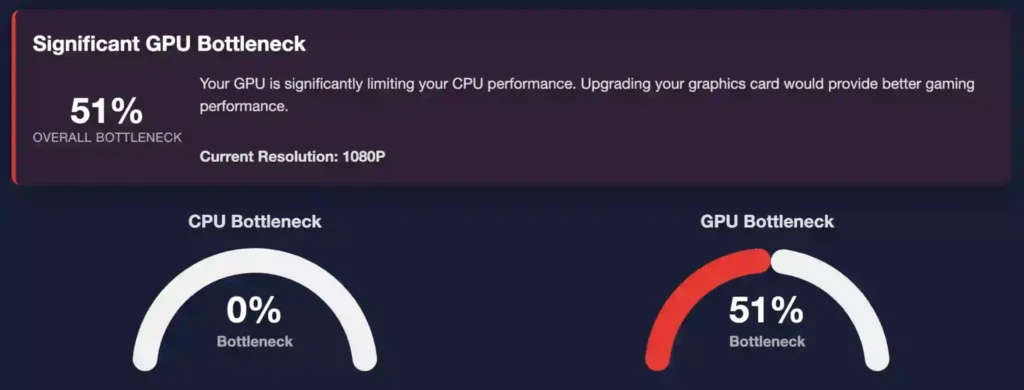
The CPU and GPU are the heart of your system: the CPU handles calculations, while the GPU takes care of graphics. For your PC to run smoothly, they need to work together in harmony. A bottleneck occurs when one component has to work harder than the other, slowing down the entire system. In other words, if your CPU or GPU can’t keep up, it limits the performance of the other, causing lag, stuttering, or lower FPS.
CPU Bottleneck
This happens when your graphics card is too powerful for your processor. For example, you might pair a high-end GPU like an RTX 4080 with an older i5 CPU. The result? Your GPU isn’t being fully utilized because it’s waiting for the CPU to supply frames. CPU bottlenecks usually show up in processor-heavy games, such as simulation or strategy titles, where complex calculations slow down the system.
GPU Bottleneck
This occurs when your graphics card is weaker than your processor. In this case, the GPU can’t render frames fast enough, causing FPS drops in graphically demanding games. Both CPU and GPU bottlenecks reduce performance, but knowing which one is happening is the first step toward fixing it. That’s exactly what our Bottleneck Calculator does—it tells you immediately where the problem lies.
Why Gamers Love Pc Bottleneck?
Performance matters most to gamers—everything revolves around achieving higher frame rates. However, upgrading hardware can be expensive. That’s why our tool has become essential for players who want to optimize their system without spending money unnecessarily.
Instead of upgrading blindly, you can analyze your CPU and GPU combination to see how much performance might be going to waste. In just a few seconds, it works like a quick virtual technician that evaluates your PC.
The best part is that you don’t need any technical expertise. Simply enter your components, click Calculate, and the tool will instantly identify where your system is underperforming and suggest ways to improve it.
Agar chaho to main isko aur bhi advanced (SEO blog style, YouTube script style, ya website landing page style) mein bhi rewrite kar sakta hoon.
Step-by-Step Guide to Using the Bottleneck Calculator
It helps identify which part of your computer is responsible for slow performance, whether you are gaming, editing videos, or running multiple demanding applications at the same time. The tool is extremely simple to use, making it accessible even for beginners with little to no technical experience.
Understanding Common Bottleneck Ratios
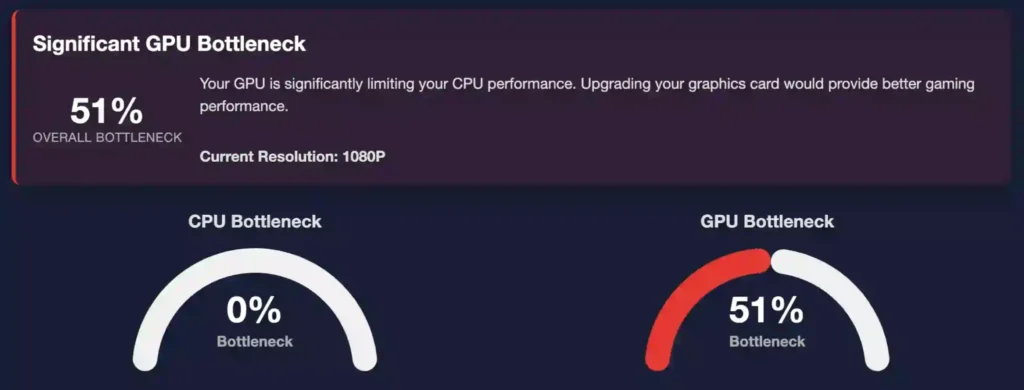
When you use the Bottleneck Calculator, the results typically appear as percentages such as 5%, 15%, or 30%. These values indicate how balanced your system’s components are. Here’s what each range means:
- 0–10% Bottleneck: Excellent balance. Your CPU and GPU are working together efficiently, allowing your system to perform at its full potential.
- 10–20% Bottleneck: Slight imbalance. In most cases performance remains smooth, but you may notice minor slowdowns during demanding games or heavy workloads.
- 20–30% Bottleneck: Moderate bottleneck. Performance issues can become more noticeable, and upgrading one of the components may help improve overall system efficiency.
- 30%+ Bottleneck: Severe bottleneck. One component is significantly limiting the performance of the entire system.
This simple percentage scale allows you to quickly evaluate your PC’s performance balance and understand the overall health of your system at a glance.
How Accurate Is the Bottleneck Calculator?
Our algorithm is built using industry benchmarks, real-world gaming performance data, and an extensive database of hardware components. While no online calculator can perfectly replicate every possible workload or system configuration, our tool provides one of the most reliable performance estimates available.
It delivers insights that are accurate enough to help you plan upgrades with confidence—whether you are building a new gaming PC, setting up a video editing workstation, or creating a dedicated streaming system.
What Causes Bottlenecking in Gaming PCs?
Many gamers strive for higher FPS or smoother graphics, yet sometimes their system doesn’t perform as expected. This slowdown is often caused by a bottleneck—an invisible limitation within your setup.
Bottlenecking can result from several factors, not just mismatched components:
Outdated CPUs: Struggle to handle modern game logic and background processes efficiently.
High-resolution gaming: Playing at 1440p or 4K places heavier demands on the GPU.
Slow RAM or storage: Limited memory bandwidth or SSD speeds can restrict data flow.
Power limits and thermal throttling: Can reduce the performance of even high-end components.
With this Bottleneck Calculator, you can pinpoint the root cause of performance issues and determine whether it’s a hardware imbalance or something that can be resolved through optimization.
Bottleneck Calculator for Streamers and Content Creators
Bottlenecks aren’t just a problem for gamers. If you edit videos, stream live, or create digital art, you’ve likely experienced slowdowns during rendering or exporting. Often, this is a CPU bottleneck at work. When your CPU handles multiple demanding tasks—like recording, encoding, and rendering simultaneously—it can reach 100% usage, leading to stutters or freezes.
Our Bottleneck Calculator helps content creators pinpoint the exact source of these performance issues. It makes it easier to determine whether you need to upgrade your CPU, add more RAM, or optimize your software settings for smoother workflows.
How to Fix a Bottleneck (Once You Identify It)
Once you’ve used the calculator, resolving a bottleneck depends on which component is causing the slowdown:
CPU-related bottlenecks: Reduce background processes or consider upgrading to a newer, faster CPU.
GPU-related bottlenecks: Lower resolution or graphics settings to reduce the load.
RAM, storage, and cooling: Optimizing memory usage, upgrading to faster SSDs, and improving cooling can boost overall performance.
Software optimizations: Updating BIOS, drivers, or system software can often yield significant improvements.
Our tool provides tailored suggestions, helping you maximize your PC’s performance without spending unnecessarily on upgrades.
When Should You Upgrade Your PC Components?
Knowing the right time to upgrade your PC can be tricky. Many assume that a drop in performance means a complete system overhaul—but that’s not always the case. The Bottleneck Calculator helps you make informed decisions.
Low bottleneck (under 10%): Your system is well-balanced, and upgrades aren’t immediately necessary.
High bottleneck (20% or more): One component is clearly limiting performance and should be prioritized for an upgrade.
For instance:
CPU bottlenecking the GPU by 30%: Upgrading to a newer processor can immediately unlock higher frame rates.
GPU bottlenecking the CPU: Upgrading your graphics card allows your CPU to operate at full potential.
Our tool doesn’t just identify the problem—it helps you plan your upgrades strategically. That means no wasted money, no random component swaps, and no disappointment.
How the Bottleneck Calculator Benefits Gamers and PC Builders
Whether you’re a hardcore gamer, a content creator, or building your very first PC, knowing how well your components work together is crucial.
The Bottleneck Calculator supports you in three key ways:
How the Bottleneck Calculator Benefits Gamers and PC Builders
Whether you’re a hardcore gamer, a content creator, or building your very first PC, knowing how well your components work together is crucial.
The Bottleneck Calculator supports you in three key ways:
For Gamers
The Bottleneck Calculator shows whether your CPU or GPU is holding back your FPS, allowing you to adjust settings or plan upgrades with confidence.
Your system will perform at different resolutions—1080p, 1440p, or 4K—so you can make informed decisions before spending a single dollar.
For First-Time PC Builders
Building your first PC? Avoid mismatched components that can limit performance.
The Bottleneck Calculator ensures your CPU and GPU work in harmony, helping you get the maximum performance for every dollar spent.
For Creators and Streamers
Content creation software such as Adobe Premiere, OBS, and Blender depends heavily on both your CPU and GPU. By using the Bottleneck Calculator, you can pinpoint which component is limiting your rendering or streaming performance—and upgrade only what’s truly necessary.
Real-World Examples: How Bottlenecks Impact Different Users
Understanding bottlenecks is key to maximizing your PC’s performance. Here are some real-world examples illustrating their impact:
Example 1: The Competitive Gamer
Ali is passionate about online shooters. Even with a high-end RTX GPU, his old CPU hits 100% usage during gameplay, causing lag, micro-stutters, and unstable FPS. After running the Bottleneck Calculator, he discovers that his CPU is the limiting factor. Upgrading to a modern processor resolves the issue immediately, delivering smoother gameplay, improved responsiveness, and higher frame rates.
Example 2: The Content Creator
Sara edits 4K videos daily. Her GPU is strong, but rendering times are painfully long. Using the Bottleneck Calculator, she finds her CPU is maxed out while her GPU sits idle. By upgrading her CPU and adding more RAM, she halves her rendering time, making her workflow far more efficient.
Example 3: The Casual Gamer
Bilal enjoys casual gaming and streaming, but his system occasionally lags without an obvious cause. The Bottleneck Calculator reveals that his GPU is too weak for his CPU. Instead of replacing both components, he upgrades only the GPU, saving money while dramatically improving performance and gameplay experience.
Tips to Optimize Your PC and Reduce Bottlenecks
Not every bottleneck needs a hardware fix. Here are some quick ways to improve performance without spending money:
- Close background programs that eat CPU power.
- Lower resolution or frame rate to reduce GPU load.
- Update your CPU and GPU drivers regularly.
Optimize in-game settings, including shadows, reflections, and textures. - Ensure proper cooling to avoid thermal throttling.
Small changes can make a big difference, especially if your bottleneck ratio is below 20%.
Bottleneck Calculator for Smart and Informed PC Upgrades
Planning a new PC build? The Bottleneck Calculator lets you experiment before making any purchases. You can test various CPU and GPU combinations, evaluate their balance, and identify the best pairing for your budget. Whether you’re upgrading from a GTX 1660 to an RTX 4070 or moving from a Ryzen 5 to a Ryzen 9, the tool shows exactly how these changes will impact performance.
This approach saves time, money, and frustration, ensuring that every component you choose integrates seamlessly into your system for optimal performance.
The Emotional Impact of PC Performance
Let’s face it—lag kills excitement. You save for months, build your dream rig, and the moment you launch your favorite game… it stutters. That frustration is exactly what the Bottleneck Calculator is designed to eliminate.
This tool doesn’t just crunch numbers; it gives you control and confidence. By helping you understand your PC’s performance, it ensures your system runs smoothly, transforming your experience: every game feels more immersive, every project completes faster, and every action feels satisfying. With the right balance, your PC becomes more than just hardware—it becomes a source of joy and efficiency.
Frequently Asked Questions
Frequently Asked Questions
The Future of PC Optimization
As games and creative software continue to demand more from our systems, achieving the right balance between components becomes increasingly important. Gone are the days of random upgrades—every decision can now be data-driven.
With tools like the Bottleneck Calculator, anyone can make informed choices, whether building a $500 budget rig or a $3,000 gaming powerhouse. Success is no longer about raw power alone; it’s about harmony between your CPU, GPU, RAM, and storage—and this tool helps you find it in seconds.
Try the Bottleneck Calculator Today
Your PC shouldn’t hold you back—and with the right tools, it won’t. The Bottleneck Calculator gives you the insight you need to build, upgrade, and optimize with confidence, eliminating lag before it becomes a problem. No more guesswork—just clear, actionable results.
Check your system balance now—it’s fast, free, and easy. Every great gaming moment, every smooth workflow, deserves the performance to run flawlessly.